

As an LBank user, you can easily purchase cryptocurrencies such as USDT, USD1, BTC, ETH, or USDC using a credit or debit card (collectively referred to as a “bank card”). LBank supports over 115 fiat currencies (e.g., USD, EUR, TWD) and payment methods including Visa and MasterCard. Each account can add up to 5 bank cards. The process is secure, efficient, and typically completes within minutes. Below is a detailed step-by-step guide. Ensure your account has completed KYC verification before proceeding.
How-to Steps
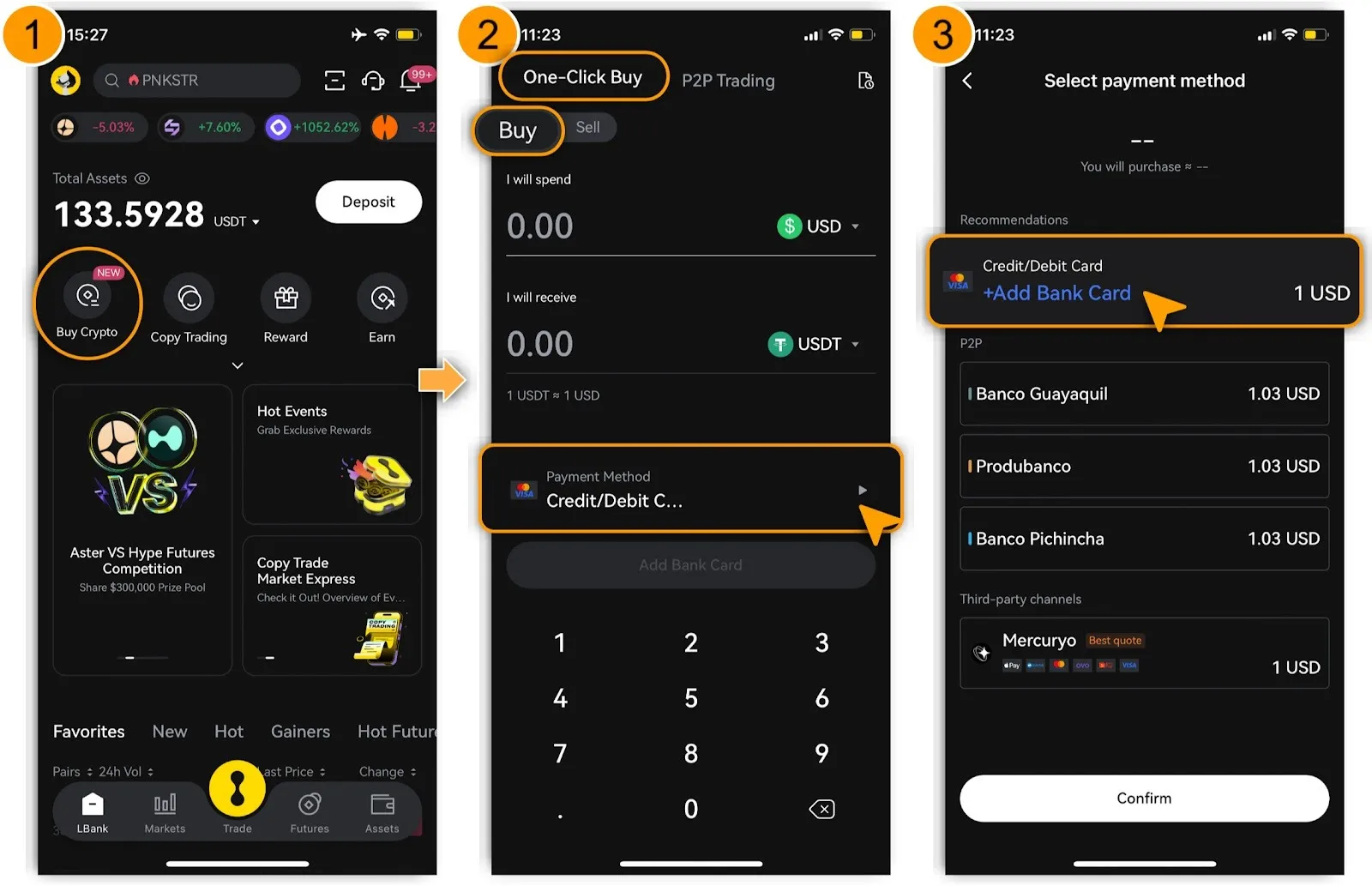
Step 1: Log in to LBank and Access「Buy Crypto」
-
Open and log in to the LBank App. If you don’t have an account, register and enable two-factor authentication (2FA) for enhanced security.
-
On the homepage, tap「Buy Crypto」and select「One-Click Buy > Buy」.
Step 2: Add a Bank Card
-
Tap「Payment Method」to「+ Add Bank Card」.
Step 3: Bind the Bank Card
-
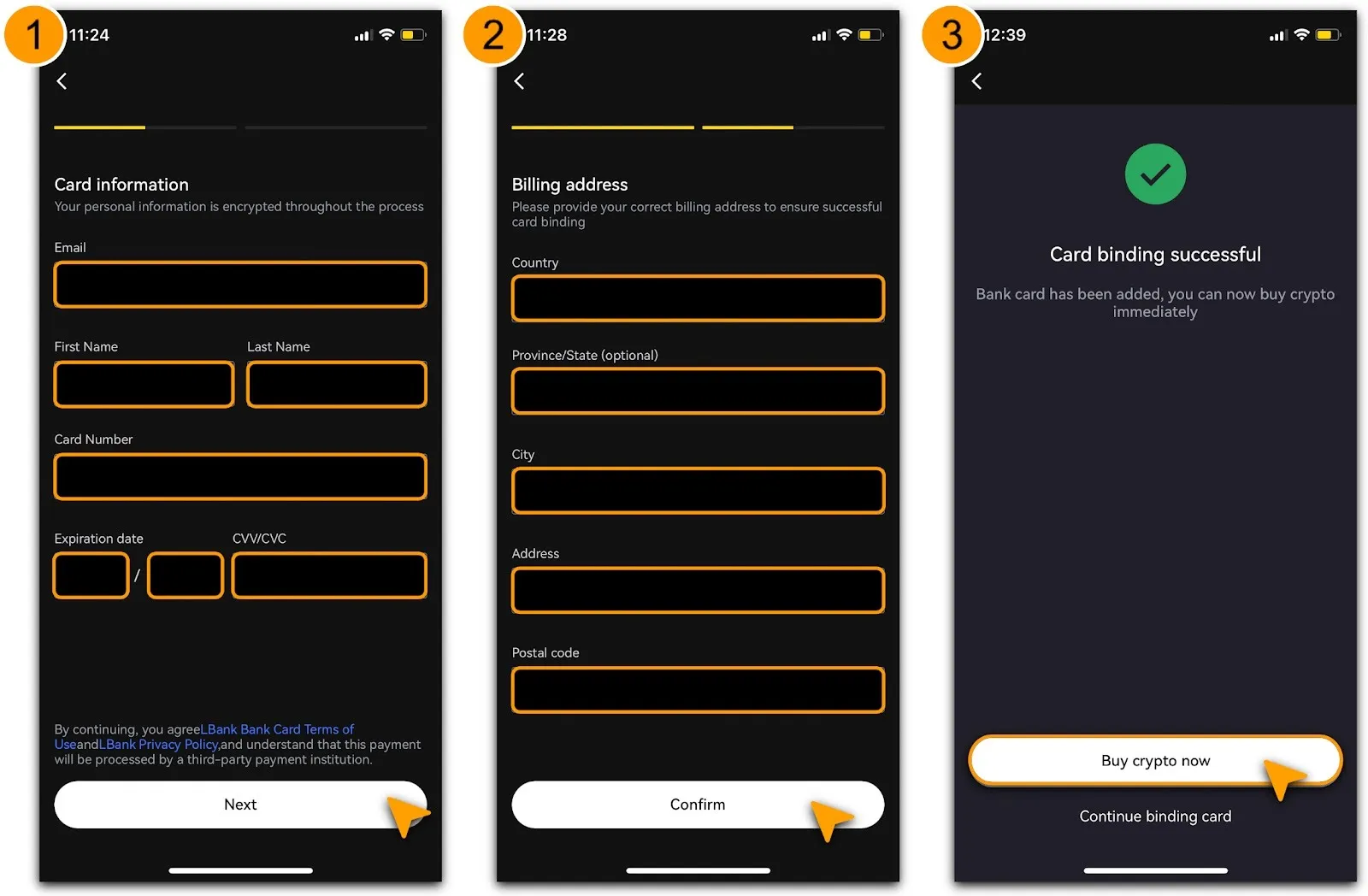
Enter the required card details: includes「Email」,「First Name」,「Last Name」,「Card Number」,「Expiration date」, and「CVV/CVC」. Tap「Next」.
-
Enter information of「Billing Address」includes「Country」,「Province/State(Optional)」,「City」,「Address」and「Postal Code」, tap「Confirm」;
-
Upon successful verification, you’ll see a「Card Binding Successful」message prompt. Tap「Buy Crypto Now」to proceed with your purchase.
Notes & Safety Tips
Restricted Card-Issuing Countries/Regions
Due to compliance, regulatory, and payment network requirements, LBank currently does not support deposits made with bank cards issued by financial institutions in certain countries or regions. If your bank card is issued by a financial institution in any of the jurisdictions listed below, card deposit transactions on the platform will not be available.
-
The currently restricted countries and regions include:
-
North Korea (KP), Russian Federation (RU), Eritrea (ER), Iran (IR), Afghanistan (AF), Cuba (CU), Belarus (BY), Libya (LY), Syria (SY), Burundi (BI), Central African Republic (CF), Democratic Republic of the Congo (CD), Côte d’Ivoire (CI), Guinea (GN), Guinea-Bissau (GW), Lebanon (LB), Mali (ML), Myanmar (MM), Nicaragua (NI), Somalia (SO), South Sudan (SS), Sudan (SD), Venezuela (VE), Iraq (IQ), Yemen (YE), Zimbabwe (ZW), Mainland China (CN), Algeria (DZ), Bangladesh (BD), Egypt (EG), Germany (DE), India (IN), Netherlands (NL), United Kingdom (GB), Ukraine (UA), United States (US), Canada (CA), Japan (JP), Saudi Arabia (SA), Pakistan (PK), Morocco (MA), Nepal (NP), and North Macedonia (MK).
-
In addition, certain territories with limited recognition or special political status may also be restricted, including but not limited to: Transnistria, Northern Cyprus, Western Sahara (EH), Ambazonia, Kosovo (XK), and the occupied territories of Georgia.
-
If your payment fails, please first confirm that your card information has been entered correctly and check whether your bank card has international transactions or online payment functions enabled. If the issue persists, please contact your card issuer for further assistance to confirm whether there are any payment restrictions on your card, or use another deposit method supported by the platform.
Thank you for your understanding and support. If your jurisdiction is subject to the restrictions above, we recommend using other deposit methods supported by the platform.
Reminder
Cryptocurrency prices are highly volatile. Please fully assess the related risks before making any investment decisions. This guide is for operational reference only and does not constitute any financial or investment advice. For your first crypto purchase, it is recommended to start with a small amount, such as 10 USD, and gradually increase the amount after confirming that the process works smoothly.
By following these steps, you can efficiently enter the crypto market. LBank is committed to providing low fees and high liquidity. Explore more features on the platform. For advanced guides, refer to the「LBank One-Click Buy/Sell Crypto Guide」&「LBank Fiat Trading Guide」. Start your crypto journey now!